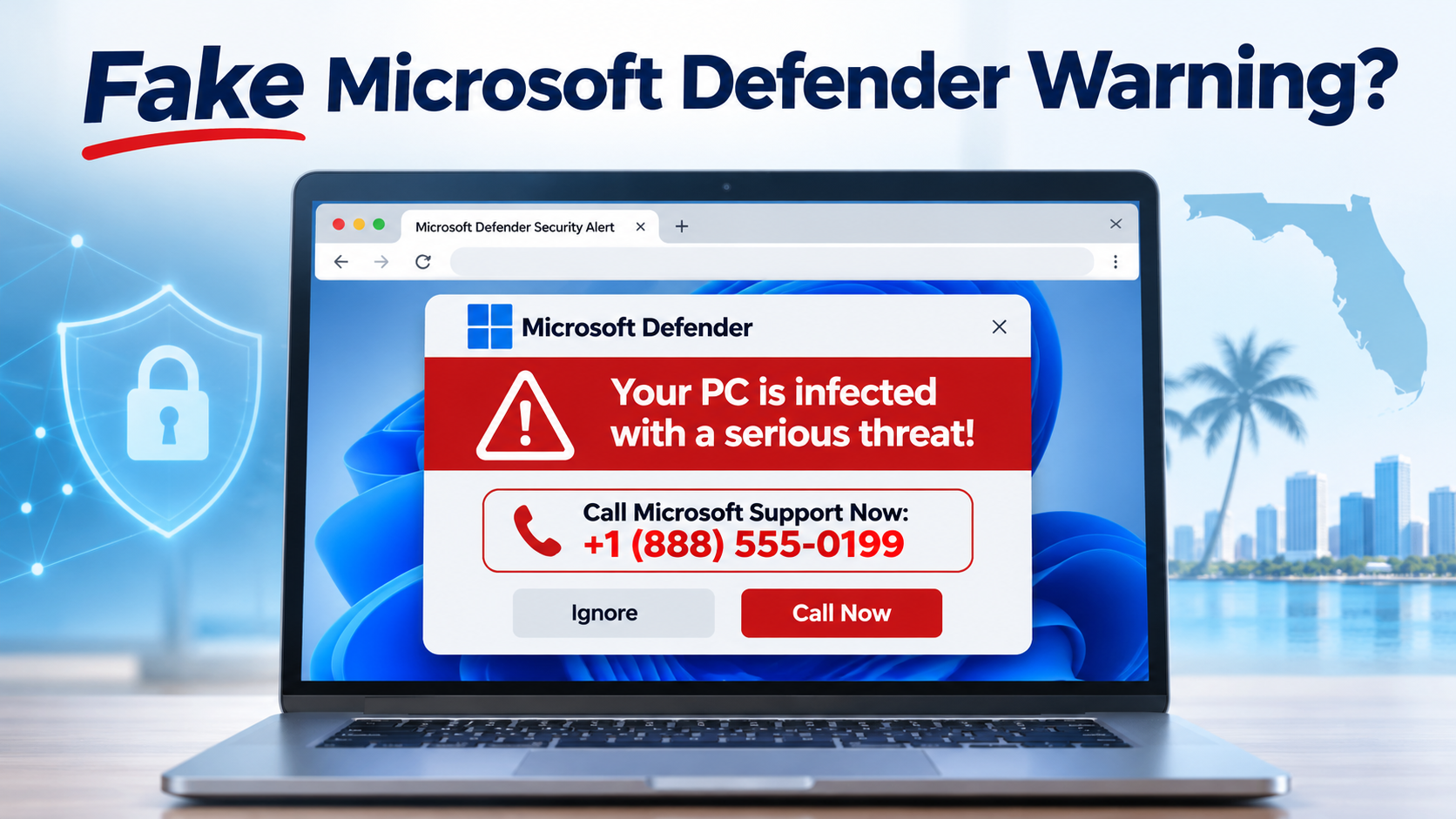
Seeing a Microsoft Defender security warning with a phone number, a loud alarm, or a message saying your computer is locked? It may be a fake Microsoft Defender warning—a tech support scam designed to frighten you into calling a scammer or granting remote access. Do not call the number displayed in the pop-up. Microsoft says its genuine error and warning messages do not include telephone numbers.
Need help in Florida? Jeff Computers provides computer security assessments, virus and malware removal, and assistance with suspicious remote-access software for customers in Sarasota, Osprey, Venice, Nokomis and nearby communities. Call Jeff Computers: (941) 263-0705.
Fake Microsoft Defender Pop-Up? Do These 5 Things First
- Do not call the number shown in the warning.
- Do not click its buttons, download files, or share passwords.
- Close the browser: try Alt+F4, or press Ctrl+Shift+Esc, select the browser in Task Manager, and choose End task.
- Do not restore suspicious tabs when reopening the browser.
- If you gave remote access or payment details, disconnect the affected device from the internet, use a trusted device to change passwords, and contact your bank or card issuer immediately.
Concerned the scammer accessed your computer? Call (941) 263-0705 for computer security help.
What Is a Fake Microsoft Defender Warning?
A fake Microsoft Defender warning is a fraudulent website, browser notification, or pop-up that imitates a Windows security alert. It may claim that a Trojan, spyware, or other virus has been detected, that your computer is blocked, or that hackers are stealing personal or banking information. It often displays a supposed Microsoft support number and demands immediate action.
Important: seeing a fake pop-up does not by itself prove your computer is infected. Some scams are simply malicious webpages or browser notifications. A risk becomes more serious if you downloaded software, granted remote access, entered credentials, or paid the caller.
How to Tell a Microsoft Defender Pop-Up Is a Scam
- It displays a phone number and tells you to call “Microsoft support.”
- It uses loud beeping, spoken warnings, or full-screen browser messages.
- It claims your computer or IP address is blocked until you call.
- It warns that your banking information is being stolen without showing verifiable security findings.
- It asks you to install remote-support software or pay for immediate repairs.
- It tells you not to close your browser or restart the computer.
Real Microsoft Defender security notifications can occur, but a browser warning demanding a phone call is a major red flag. Verify any security concern through the Windows Security app or Microsoft’s official website—not a number displayed by an unfamiliar webpage.
How to Remove a Fake Microsoft Defender Warning or Virus Pop-Up
1. Close the suspicious webpage safely
Do not interact with the pop-up itself. On Windows, try Alt+F4 to close the active window. If it remains, press Ctrl+Shift+Esc to open Task Manager, select Microsoft Edge, Chrome, Firefox, or the affected browser, and choose End task. If the browser reopens with a prompt to restore previous tabs, decline to restore the suspicious session.
2. Check browser notifications and extensions
Repeated “virus detected” notifications may come from a website you accidentally allowed to send notifications. Review your browser’s site-notification permissions and block unfamiliar websites. Remove unrecognized browser extensions. Avoid deleting unrelated files or making major system changes without understanding the cause.
3. Update Windows and run a legitimate security scan
Open Windows Security from the Start menu, update security intelligence, and run an appropriate Microsoft Defender Antivirus scan. Review any detections and follow the official remediation guidance. A clean scan is reassuring but does not establish that an account or device was never accessed.
4. Get help if the warnings keep returning
If fake warnings reappear, the browser behaves strangely, unknown software is installed, or you suspect a scammer gained access, a professional computer-security assessment may be appropriate. Jeff Computers can discuss virus removal, suspicious software assessment, and next steps for Sarasota-area customers.
Fake virus pop-up won’t go away? Call Jeff Computers at (941) 263-0705.
What If You Called the Fake Microsoft Support Number?
Calling a fake number does not automatically mean your computer was hacked. However, scammers may persuade callers to share passwords, provide payment information, or install remote-access tools. If you did any of these, take the following precautions:
- Stop communicating with the caller and do not send additional money.
- If remote access was granted, disconnect the affected computer from Wi-Fi or Ethernet.
- From a different trusted device, change exposed passwords and enable multifactor authentication.
- Contact your bank, credit card issuer, or investment provider immediately if financial information or payments were involved.
- Preserve receipts, caller numbers, emails, and screenshots where available.
- Arrange an assessment of the affected computer before using it for sensitive accounts again.
Can a Fake Microsoft Defender Scam Steal Money From Your Bank Account?
Yes, some tech-support scams escalate into financial fraud. A scammer might charge for a fake repair, collect card details, persuade you to approve a transfer, or misuse access to accounts. However, a pop-up appearing on screen does not mean money has already been stolen. If you notice unauthorized transactions, contact your financial institution first. Jeff Computers helps with device-security concerns; it cannot reverse bank transfers or guarantee recovery of stolen funds.
Why Do Fake Virus Pop-Ups Keep Appearing?
Common causes include deceptive websites, browser notification permissions, suspicious extensions, unwanted applications, and adware. Sometimes a browser simply reopens the same scam page after a restart. The appropriate fix depends on the source, so avoid assuming every warning requires a full operating-system reinstall.
Fake Microsoft Tech Support Calls in Florida
Tech support scams can also begin with unsolicited phone calls. A caller may claim to work for Microsoft, say your computer is infected, or insist you must install software to prevent banking fraud. Caller ID can be spoofed. Florida’s Attorney General has published warnings about pop-up and phone-based tech support scams.
Remember: Microsoft does not make unsolicited calls to fix your computer. Never grant remote access to someone who unexpectedly contacts you claiming to be technical support.
How Jeff Computers Can Help After a Tech Support Scam
Jeff Computers offers computer repair and cybersecurity-related assistance, including:
- Virus and malware removal: evaluate and address malicious or unwanted software.
- Suspicious remote-access software checks: identify applications that may allow someone else to control the device.
- Browser pop-up troubleshooting: investigate persistent fake alerts, browser hijackers, and unwanted notifications.
- Computer security assessment: review relevant device settings and possible indicators of compromise.
- Digital investigation: discuss whether further examination of suspicious device activity is appropriate.
Services and investigation findings depend on the device and circumstances. No assessment can guarantee identification of a scammer or recovery of money.
Serving Sarasota, Osprey, Venice, Nokomis, North Port, Englewood and nearby Florida communities. Contact Jeff Computers to confirm the service arrangement for your location.
Call Jeff Computers: (941) 263-0705 Request Security Help
Frequently Asked Questions About Fake Microsoft Defender Warnings
Is the Microsoft Defender security warning with a phone number real?
No. Microsoft says genuine error and warning messages do not include phone numbers. A browser alert telling you to call technical support is a strong indicator of a scam.
What should I do if my computer says it is locked by Microsoft?
Do not call the displayed number. Try closing the browser with Alt+F4 or Task Manager. If the device is actually inaccessible outside the browser, seek legitimate technical support.
How do I stop fake Microsoft Defender pop-ups?
Close the suspicious webpage, block unwanted browser notifications, review unfamiliar extensions, and run an up-to-date security scan. Persistent symptoms may need professional assessment.
Does a fake virus popup mean my computer is hacked?
Not necessarily. Many are deceptive websites rather than evidence of malware. The risk increases if you installed software, shared credentials, or allowed remote access.
What if I already gave a scammer access to my computer?
Disconnect the device from the internet, use a trusted device to change passwords, contact affected financial institutions, and have the computer assessed before sensitive use.
Can a fake Microsoft warning steal banking information?
Scammers may obtain banking details through phishing, payments, or remote access, but seeing a warning alone does not prove data theft. Contact your bank immediately if financial details were exposed.
Why does the fake virus alert return every time I open my browser?
The browser may be restoring the same tab, or an unwanted website may have notification permission. Browser extensions or adware are other possibilities.
Will Microsoft call me about a virus on my computer?
Microsoft does not make unsolicited support calls asking to fix a computer or obtain financial information. Treat unexpected calls as suspicious.
Where can I get fake virus popup removal help in Sarasota, Florida?
Jeff Computers provides virus removal, computer security assessments, and related assistance in Sarasota and nearby communities. Call (941) 263-0705 to discuss your device.
Can Jeff Computers recover money paid to a tech support scammer?
Jeff Computers cannot guarantee financial recovery or reverse transactions. Contact your bank or card issuer promptly about disputes; Jeff Computers can help assess a potentially compromised computer.
Report a Fake Microsoft Support Scam
Report suspected scams to FTC ReportFraud, FBI IC3 when appropriate, and Microsoft’s scam reporting page. Florida consumers can also find consumer protection information through the Florida Attorney General.
Need Help With a Fake Microsoft Defender Warning in Florida?
If you are seeing repeated virus warnings, suspect a scammer accessed your computer, or need help removing suspicious software, Jeff Computers can discuss the appropriate next steps. For urgent financial losses, call your bank first.
Call (941) 263-0705 for Computer Security Help
Related Jeff Computers Guides and Services
- Virus & Malware Removal
- Online Scam Help & Computer Security
- What to Do if Your Computer Is Hacked
- Digital Forensics in Sarasota