
The reported security alerts associated with DZKJ deserve investigation before the software is trusted on a business computer. Direct system calls, possible monitoring evasion, and unusual execution details raise questions. A valid digital signature does not settle those questions, and the supplied alerts alone do not prove data theft or identify an attacker.
For repair businesses, this matters because a workstation may also hold customer backups, saved passwords, remote-support access, or forensic evidence. A useful repair application still needs to be evaluated according to the access it receives.

What DZKJ does
DZKJ, promoted at dzkj16888.com, provides electronic schematics and printed circuit board layouts. A schematic explains electrical connections; a boardview helps a technician locate components on the physical board. Its website advertises more than 100,000 schematics and boardviews and lists phones, laptops, drones, and game consoles. That is a vendor content claim, not a user count.
This article explains reported findings supplied for review and places them alongside public sources. The executable itself was not independently acquired or run for this article. Conclusions therefore remain specific to the available evidence.
Who uses this type of software
The following audiences are inferred from DZKJ’s advertised repair functions; they are not verified customer demographics.
| Likely audience | Practical use |
|---|---|
| Phone repair technicians | Locate circuits involved in charging, power, display, or connector faults. |
| Microsoldering and board repair specialists | Identify tiny components and trace connections before testing or replacing parts. |
| Laptop and other electronics repair shops | Consult layouts for supported computers, consoles, and drones. |
| Repair trainees and advanced hobbyists | Study supported circuits and learn component identification. |
How many people use DZKJ
The website’s phrase “30M installation package” describes download size, not 30 million installations. GitHub lists the current DZKJSetup.exe at 31,597,128 bytes, or about 30.13 MiB (31.60 MB). This corroborates the size interpretation.
On September 22, 2026, GitHub recorded 133,094 downloads across 15 published files in 13 DZKJ releases. This total comes from adding the release files’ public download counters. The 1.0.0.55 installer alone accounted for 15,311 downloads; its release total is 15,510 when a second file is included.
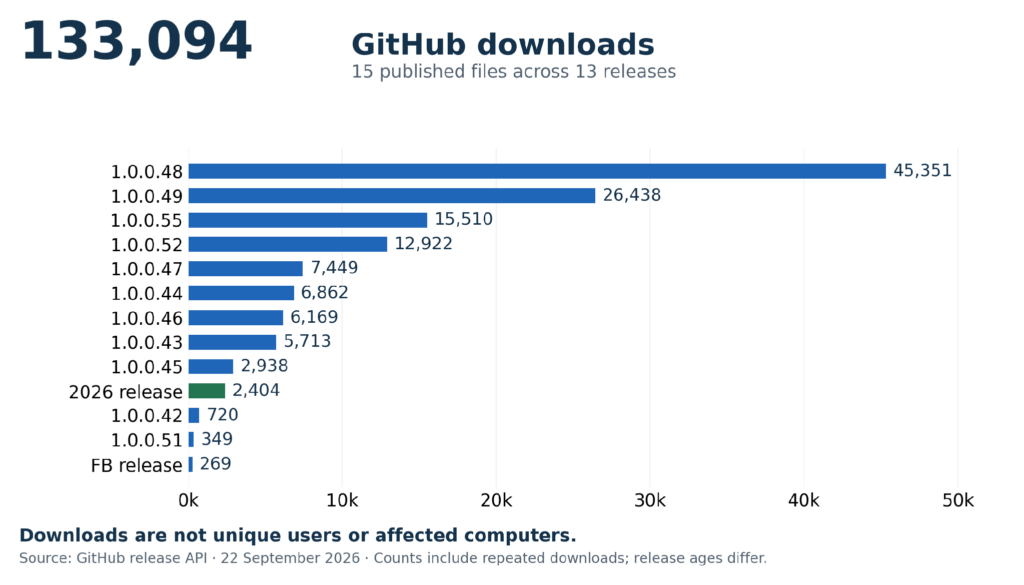
Important: These downloads are not unique users or affected computers. The counters can include repeat downloads and exclude other distribution channels.
What the signature and hashes tell us
| Reported field | Value |
|---|---|
| Signer identity | SHENZHEN XINXUNWEI ELECTRONICS CO., LTD. |
| Signature verification | SignedVerified |
Supplied SHA-256
71ba20ad3f3a16e9a38a1f52b2dde297a6b11c0220afdb3a96d128346b7c6dc9
Supplied SHA-1
fa57574e6e43b1f159838a053a81c699415feea0
A hash is a fingerprint calculated from bytes. The SHA-256 above identifies the sample supplied for discussion, but it was not independently recalculated here. Analysts need the exact file, version, source URL, and original report to connect every alert to that fingerprint.
The SHA-1 appeared beside signing information. Without the original report layout, it is unclear whether it identifies the executable or a certificate. A certificate thumbprint can be shared by many files signed with that certificate; a file hash identifies a particular file. They should not be used interchangeably.
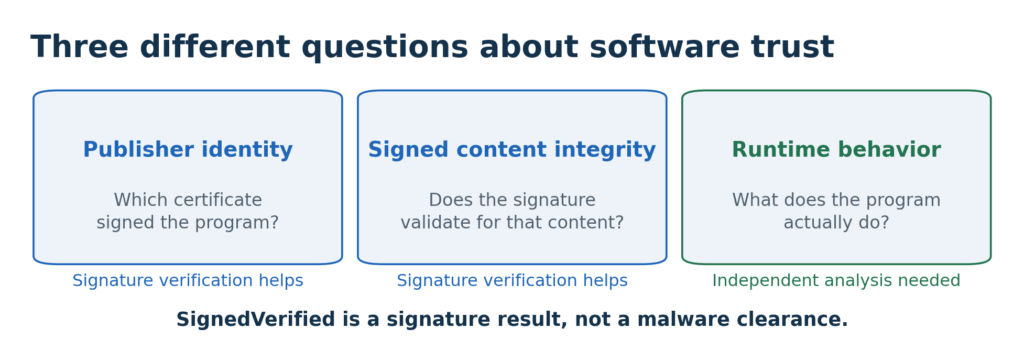
SignedVerified reports successful signature verification in the checking environment. Authenticode helps establish the signing identity and integrity of signed content. It does not certify that the program behaves safely, and it does not establish who operates a website. The certificate chain, timestamp, revocation status, and vendor relationship still need checking.
Identity, integrity, and runtime behavior answer different questions. The reported signer name alone does not establish a relationship with any government.
This distinction matters when a signed application triggers an alert: dismissing the alert because the signature verifies can leave the actual behavior unexplained.
Direct system calls and monitoring evasion
A system call, or syscall, asks the Windows kernel to perform an operation, such as managing memory or opening an object. The kernel is the part of the operating system that controls these low-level operations. Applications commonly reach it through Windows libraries.
Endpoint detection and response, or EDR, records suspicious activity and helps defenders investigate it. Some EDR monitoring uses hooks in application-level library functions. The supplied alerts describe direct syscalls originating in the main executable and in a loaded library, which can bypass some of those observation points.
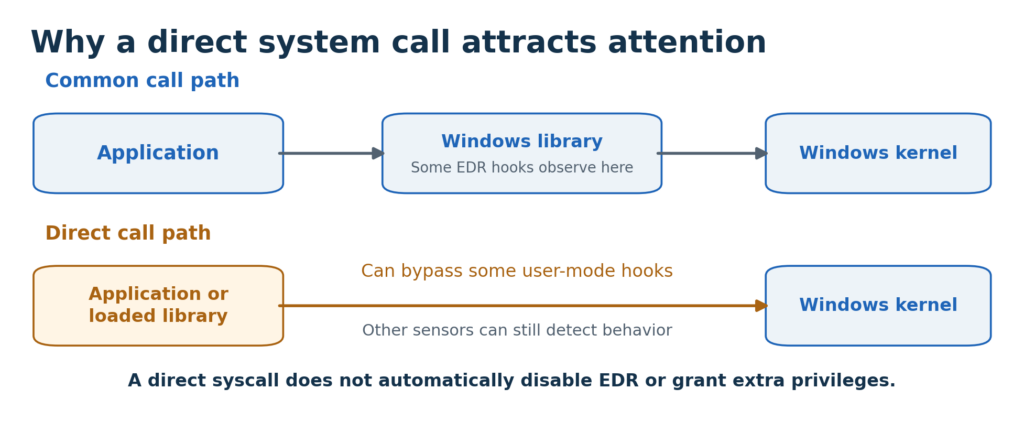
The concern is reduced visibility into what the program is doing. The excerpt does not establish which operations occurred, that EDR was disabled, or that malicious activity succeeded. The labels under “Direct Syscall” and “Malware” may describe overlapping events rather than separate attacks.
Vectored exception handlers and debugger evasion
A vectored exception handler is a function registered to receive certain runtime exceptions, such as memory-access faults. Windows explicitly supports this mechanism. Registering one is not inherently malicious.
Exception handling can also help software change its execution path or detect analysis. A debugger lets an analyst inspect execution; evasion can make that inspection harder. The security question is what the handler does after registration. The registration alert alone does not prove a debugger was detected or evaded.
Unusual resources and the MITRE technique labels
Windows executables can contain embedded resources, including icons, interface text, and application-specific data. The alert “Process executed with non-standard resource type” points to an unusual detail that requires inspection. It does not reveal the resource’s contents or prove that it contained executable malware.
MITRE ATT&CK is a catalog used to describe adversary behavior. A technique tag tells an analyst what to investigate; it is not a separate confirmation that an attack occurred. The supplied mappings should be checked against the actual execution trace.
| Technique | Meaning and significance | Evidence still needed |
|---|---|---|
| T1685 Disable or Modify Tools | Interfering with security tools or their visibility can weaken detection. | A direct syscall alone does not establish that a tool was disabled or modified. |
| T1622 Debugger Evasion | Detecting or avoiding a debugger can obstruct analysis. | What the exception handler checked or changed, beyond merely registering it. |
| T1132 Data Encoding | Encoding command-and-control traffic can obscure instructions or responses. | Relevant network traffic and its purpose. An unusual resource does not establish a remote-control channel. |
| T1027 Obfuscated Files or Information | Concealing code or data makes inspection more difficult. | The resource or code contents and the mechanism used to conceal them. |
| T1480.001 Environmental Keying | Deriving a decryption key from the intended environment can restrict where a payload runs. | An environment-derived key and its use. A custom resource type alone is insufficient. |
| T1106 Native API | Native APIs and syscalls access operating-system services. This provides additional context for the syscall alerts. | The requested operations, parameters, and their results. |
The tactic names describe possible objectives: Defense Impairment reduces protection; Stealth conceals activity; Discovery gathers information; Command and Control supports communication with an operator.
The report headings “General,” “Malware,” and “Evasion” group findings. Multiple headings or tags can describe one behavior; they are not a count of intrusions.
A public sandbox report concerns a different file
A public ANY.RUN report dated February 11, 2025, labels a file named DZKJ-1.0.0.55.exe as showing “Malicious activity” and includes loader and Themida tags. Its SHA-256 is shown below. It is different from the SHA-256 supplied for this article.
SHA-256 of the separate ANY.RUN sample:
a53f65579b6fcf79cfc822340a5733148229ba8f1e865bcebbb347af1e21d9ca
The result is relevant background, but its verdict cannot be transferred to the current sample or every DZKJ release.
A sandbox is a controlled environment for observing software. A loader is code that loads other code; in a malware report, that label usually signals concern about delivery of an additional payload. A label alone does not identify what a different file will do, and filenames can be reused.
Could commercial software protection explain the alerts?
Yes, it is a plausible alternative explanation for some anti-analysis behavior. Themida is a commercial software protector whose developer advertises anti-debugging, code concealment, and anti-monitoring features. Such features can overlap with malware detection rules.
The separate report’s Themida tag does not establish that the supplied sample uses it, and a protection wrapper does not establish safety.
The next step is to identify the responsible code and determine its purpose. Licensing protection, a false positive, a compromised distribution, and intentionally harmful behavior remain different possibilities until the evidence distinguishes them.
Why the website advice about security alerts matters
The DZKJ website says: “If some other security software misreports, please add to trust or temporarily close it.”
It also asserts Windows security certification. The page does not establish what independent assurance that claim provides for the specific sample discussed here.
An exclusion tells a security product to permit or skip some checks on selected software. Closing protection can reduce coverage more broadly.
My recommendation is to preserve the alert and request a technical explanation before creating an exception.
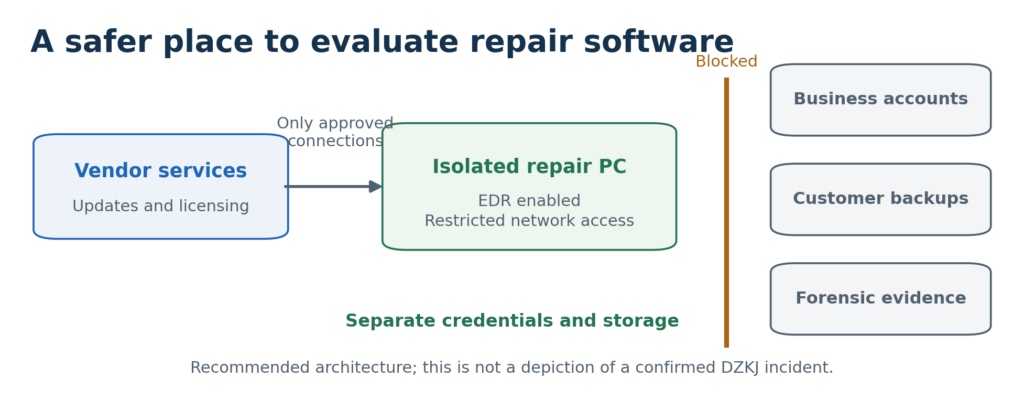
If testing is necessary, use an isolated environment with protection enabled and no customer data. A vendor’s false-positive assurance should be tested against the evidence.
China and the current United States security relationship
U.S.–China strategic competition makes software sourcing a reasonable security concern. The U.S. intelligence community’s March 2026 threat assessment identifies China as the leading source of persistent cyber activity threatening U.S. government, commercial, and critical infrastructure networks. It also describes both strategic rivalry and areas of cooperation.
This is current threat context, rather than a finding about DZKJ.
The supplied signer name identifies a Shenzhen-named company. That makes corporate identity, jurisdiction, update control, and data handling appropriate questions.
The evidence reviewed does not establish that DZKJ or the named signer is connected to the Chinese government, conducts espionage, or sends customer data to China.
Chinese-origin software can present a serious risk when unexplained behavior is combined with extensive access, opaque update practices, or inadequate accountability. Those factors deserve scrutiny in the current geopolitical environment. Country of origin alone cannot establish that software is malicious, and the same technical review should apply to suppliers elsewhere.
For a U.S. repair business, ask:
- Who controls updates?
- What information leaves the computer?
- Where does that information go?
- Which permissions are required?
- Does the vendor support independent investigation?
The significance is practical: a repair tool should not gain unnecessary access to business accounts or other clients’ information.
For sensitive work, consider a dedicated reference workstation or documented alternatives that meet the same repair need. An isolated virtual machine can help, but shared folders, clipboard access, USB passthrough, and network access must also be controlled.
What I recommend before trusting the software
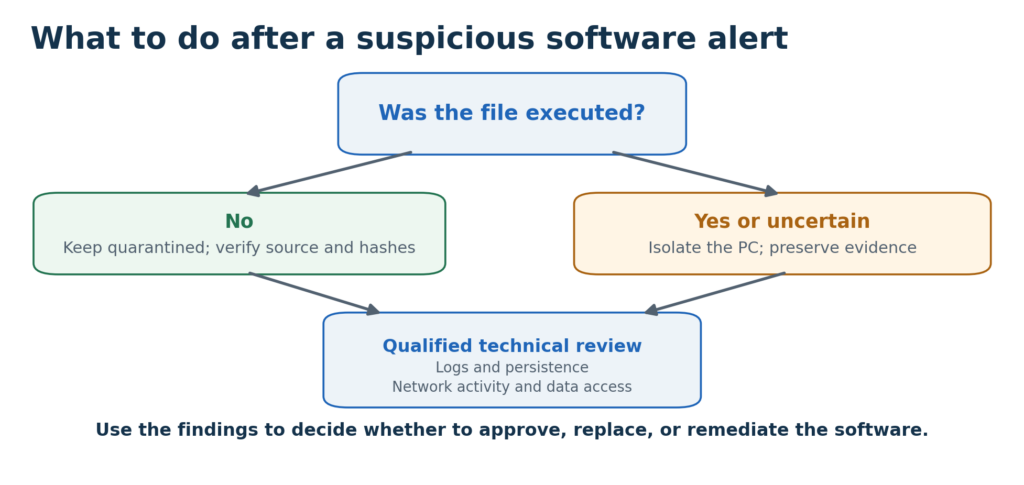
Investigation should establish what happened before the software is approved or the computer is returned to service.
1. Preserve the evidence.
Keep the installer, original download address, time of download, alert export, signature details, and calculated SHA-256. This lets an analyst verify the exact sample and avoids confusing it with another release.
2. Establish whether it ran.
If it ran or execution is uncertain, isolate the workstation from normal networks and stop connecting customer devices.
Preserve relevant evidence before deleting files or reinstalling Windows; an analyst can decide whether volatile data needs collection.
3. Review behavior and exposure.
Examine:
- Process activity
- Network connections
- Startup persistence
- New services
- Access to customer information
Persistence means a program arranges to run again. These checks distinguish an installation from a broader compromise.
4. Validate the explanation.
Ask the vendor and security provider to explain the specific detections and compare the exact file with a trusted release.
Any exception should be narrowly scoped and supported by evidence.
Sensitive files should not be uploaded to public scanning services without permission.
5. Act on confirmed findings.
If harmful activity is confirmed, determine the affected systems and accounts, remove unauthorized access, and recover from a trusted state.
Reset exposed credentials and revoke affected sessions from a clean device.
A repair utility that remains unexplained should remain restricted or be replaced.
About Jeff Minnis
Jeff Minnis is a digital forensics and cybersecurity expert and the owner of Jeff Computers and PlazSoft.
Jeff Computers provides digital forensics, cybersecurity, hacker-removal assistance, data recovery, and technical support in the Sarasota, Osprey, and Venice area.
Contact Jeff Computers for help evaluating suspicious software or preserving evidence from a suspected compromise.